
Process description
Print preferential data on documents
For printing onto invoices or for other downstream functions, Origin & Preferences Add-on for SAP offers the option of using multiple functions to identify the correct preference texts and declarations of origin for the header and item level of an invoice.
Implementation examples: https://sap-plugins.docs.developers.aeb.com/docs/example-for-method-aebcl_wu_pb_pref_chk_inv_bc-determine_preference_texts
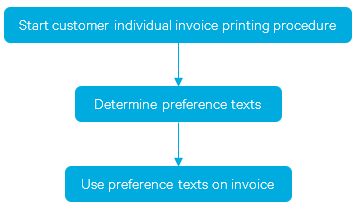
Explanation of single steps
Start customer individual invoice printing procedure
The following functions can be integrated directly into the SAP invoice printing procedure.
Determine preference texts
All document data are retrieved at runtime from the database. After this, the data can be changed by a BAdI implementation. Then every item is checked whether the preference applies. Finally, the preference texts are generated. The requirements of the agreements with regard to language, name of the countries involved, and signature requirement are taken into account.
| Business object | Relevant types of rules |
|---|---|
| Invoice | Determination of organizational unit |
Several functions are available:
| Business object | Function |
|---|---|
| Invoice | Method /AEB/CL_WU_PB_PREF_CHK_INV_BC - determine_preference_texts (recommended) - Function module /AEB/WU_PB_DET_INV_PREF_TEXTS (deprecated) |
| Delivery | Method /AEB/CL_WU_PB_PREF_CHK_DLV_BC - determine_preference_texts (recommended) - Function module /AEB/WU_PB_DET_CUS_PREF_TEXTS (deprecated) |
| Any other business object | Method /AEB/CL_WU_PB_PREF_CHK_CUS_BC - determine_preference_texts (recommended) - Function module /AEB/WU_PB_DET_CUS_PREF_TEXTS (deprecated) |
| Business object | BAdI method to change the data |
|---|---|
| Invoice | /AEB/WU_DOC_INV_01 – after_std_filling |
| Sales order | /AEB/WU_DOC_SD_01 - after_std_filling |
| Delivery | /AEB/WU_DOC_DLV_01 - after_std_filling |
| Any other business object | /AEB/WU_DOC_CUS_01 – after_std_filling |
Requirements
The following conditions must be met before the determination logic can be executed:
The SAP business object, e.g. the invoice, must already be posted in the SAP system; in other words, it must be available in the SAP database under the corresponding document number.
The “ex-works price” is relevant for determining the preference attribute. The standard logic derives this price value from the condition subtotal field KZWI5 which is calculated per item. Therefore, the “ex-works price” must already be available in this field (VBAP-, LIPS- or VBRP-KZWI5) at the time the functions below are executed. If this is not the case, the actual "factory price" must be populated using the according BAdI for the business object. Apply your logic for the parameter fields CH_PB_DOC_DO-FACTORY_PRICE and FACTORY_PRICE_CURRENCY of the BAdI to change the value of the factory price (if there was anything calculated for KZWI5, the parameter will provide the value).
Keep in mind that the price must be specified for a quantity of 1 unless you configured a different quantity unit in Origin & Preferences (Configuration path: System – Calculation/evaluation – General – Information on evaluation and calculation). Note: The parameter CH_PB_DOC_DO-ITEMS-QUANTITY of the BAdI provides the item quantity (e.g. VBAP-KWMENG, LIPS-LFIMG or VBRP-FKIMG). But it cannot be used to change the price unit.
Overview of functions
Besides the determination of preference texts, there are some additional methods in the classes /AEB/CL_WU_PB_PREF_CHK_INV_BC, /AEB/CL_WU_PB_PREF_CHK_DLV_BC and /AEB/CL_WU_PB_PREF_CHK_CUS_BC.
The fields VBAK-KUNNR and VBRK-LAND1 are the basis for determining the partner/country.
Method NEW_FOR
This method must be used to create instances.
Method CHECK_IS_TO_SIGN
This method specifies if the invoice document with the declarations of origin must be signed manually.
CHECK_ITEM_PREFERENCE
This method specifies for which item a declaration of origin may be submitted. The method returns the value of "X" if a declaration of origin may be submitted, and the value of '"-" if no declaration of origin may be
submitted. The method can be called in the invoice printing process at runtime to trigger further processes
relating to the declaration of origin according to the status of individual items.
DETERMINE_PREFERENCE_TEXTS
Requirements
Some conditions must be met before the method can select the correct preference text. Check the section Requirments above for more details.
The following logic is applied for returning the preference texts:
- The preference text that appears most frequently across the items is assigned at the header level.
- A preference text is only displayed at the item level if it differs from the header-level text.
- If none of the items qualifies for a preference, no text is shown at the header level.
Calling the method
The method provides the preference texts for a document at runtime, so it can be integrated into the invoice printing process in order to print the correct preference texts.
The determined preference texts have to be printed on the invoice. The text on header level can be placed at the beginning or the end of the invoice. Item texts should be printed at the corresponding item.
CHECK_IS_DECL_OF_ORI_ALLOWED
This method returns an indicator that specifies for the invoice if a declaration of origin may be submitted. The method returns the value of "X" if a declaration of origin may be submitted, and the value of '"-" if no declaration of origin may be submitted.
DETERMINE_ITMS_ORIG_CTRYS
Requirements
The invoice must already be posted in the SAP system – that is, available under the invoice number in the SAP database.
Call
The method provides the preferential origins of the invoice items if it is necessary to print these on the invoice item. The corresponding agreement provides if it is necessary.
DETERMINE_ITEM_AWR_SRC_CTRY
This method determines the non-preferential country of origin ("non-preferential origin") from the Material Monitor threshold data (/AEB/WUMMDMON) for every item. If no value can be determined from the data, the country of origin from the material master is returned.
Further functions
| Function module | Description |
|---|---|
| /AEB/WU_PB_DET_SO_ITM_MAT_NO | Determines the unique material number for a sales order item |
| Class | Description |
|---|---|
| /AEB/CL_WU_PB_MMD_BC | Read the complete material (threshold value) entry from the business service management |
Updated 3 months ago